Microsoft is planning to allow open source application in the Windows 8 store. It has been reported that Windows 8 will be released on February. Earlier Windows 8 Preview was released and was freely available for all. Furthermore, the Open Source Initiative license has the upper hand over the Microsoft Standard Application License Terms, namely the restriction on sharing applications.
In the Press release Microsoft Said:-
"Apps that are released under an Open Source Initiative-recognised open source licence can, at least in the pre-release version of the Windows Store, be distributed according to terms that contradict Microsoft’s Standard Application License Terms if this is required by the open source licence. Among other things, the Standard Application License Terms prohibit the sharing of applications"
Microsoft released more details about the upcoming Windows Store earlier this week. There it is clearly said that “Metro-style applications will be licensable, marketable and downloadable from the Windows 8 Store. Non-Metro-style Desktop Apps will only be marketable from inside the store, with links provided to developers’ sites for sales/downloads.”
This legal loophole may potentially benefit open-source developers in avoiding the impediments encountered by some who were frustrated and hindered by Apple’s much more restrictive App Store ‘terms and conditions’. What’s strange about this whole action taken by Microsoft? That it was accomplished almost completely under the radar, almost as if Microsoft doesn’t want to promote the fact that they’re allowing open source apps in the upcoming Windows 8 Store.
Microsoft hopes to simplify the task of managing multiple passwords with the next major release of its popular operating system. According to the Windows 8 blog, a new feature will allow users to put an unlimited number of individual passwords behind one master password, and have them synchronize across all other Windows 8 machines they use.
Since the Live ID is the only password you'll need to know, you can set complex and unique passwords for multiple websites -- so if one site gets hacked and your credentials are stolen from their servers, you entire digital lives won't be at risk. Windows 8 will automatically enter your login information when visiting a saved website. This is similar to what services like 1Password and LastPass currently offer.
If your Windows Live ID password is somehow lost or stolen, there will be a number of safety features in Windows 8 designed to detect compromise and limit account usage until you can successfully recover access to it. For instance, users can request a confirmation code be sent to a mobile phone number or email address registered with Windows Live. Also, even if your credentials are compromised, you will still have full access to your PC since Windows 8 will accept the last password successfully used to log onto the system.
Microsoft says it will also offer a a number of "convenience" sign-in methods such as Picture Password and biometrics -- they didn't go into details but promised to do so in a future update.
Video Demostration By Microsoft:-
For more information and further details Click Here
VMware Announces The Availability of VMware Workstation™ 9 (Download Free Trial)
The global leader in virtualization and cloud infrastructure, VMware globally announced the general availability of its Workstation Version 9, the latest version of its award-winning personal virtualization software. VMware Workstation 9 delivers best-in-class Windows 8 support and innovative new features that transform the way technical professionals work with virtual machines whether they reside on the PC or on enterprise private clouds. “For over a decade we have consistently delivered innovative new technologies with each Workstation release and Workstation 9 continues this tradition,” said Vittorio Viarengo, vice president, End-User Computing, VMware. “Workstation 9 brings the power of VMware virtualization to any IT professional desk and enables them to leverage the latest evolution of operating systems, processors and other technologies to be more productive and effective.”
Key features in VMware Workstation 9 include:-
Windows 8 Support– Easy install simplifies the task of creating virtual machines for Windows 8 that can run simultaneously with a variety of legacy operating systems. Unity mode intelligently works with Windows 8 applications, and multi-touch support ensures a true Windows 8 experience.
More Powerful Virtual Machines – Faster startup performance, USB 3.0 support for Windows 8 virtual machines, Intel™ Ivy Bridge compatibility, more powerful virtualization extensions, virtual performance counters, support for OpenGL 2.1 on Linux and improved 3D graphics performance make running highly demanding applications simple and efficient.
Increased Mobility – A new Web interface allows access to virtual machines running in Workstation or on VMware vSphere® from tablets, smart phones, laptops or desktop PCs. This high performance, Web-based interface delivers a native desktop experience and does not require flash or browser-based plug-ins.
Restricted Virtual Machines – IT administrators and instructors can create virtual machines and configure them to prevent employees or students from dragging and dropping files between virtual and physical desktops, attaching devices, or tampering with the virtual machine settings. Once restrictions are configured, the virtual machines can be encrypted and distributed to run on Mac, Windows, or Linux PCs with VMware Fusion® 5 Professional, Workstation 9, or VMware Player™ 5.
Better 3D Graphics- With faster 3D graphics and support for DirectX 9.0c Shader Model 3 and OpenGL 2.1 3D graphics in a Windows and now Linux virtual machine, VMware Workstation easily handles demanding 3D applications like AutoCAD, Solidworks, and many current games.
To know detailed information about VMware Workstation 9clickHere. To Download a free trial Click Here.
Microsoft is releasing their latest version of the Windows software – Windows 8 (or at least that is what it is being called until an official name is chosen). Designed around touch screens, the new operating system is hugely different than Windows systems of the past. On Wednesday Microsoft showed how it would work on both traditional PCs as well as the increasingly popular tablets. Windows 8 Features:-
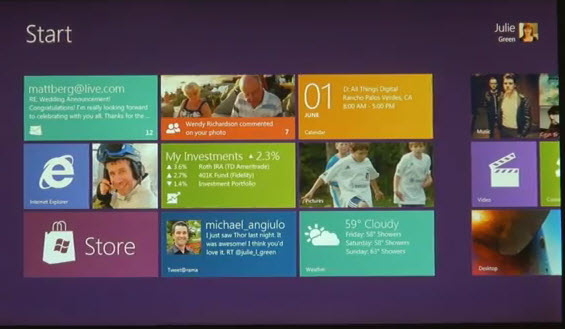
Windows 8 is designed to be used easily with or without a keyboard and mouse. It is clearly optimized for small devices like tablets with touch screen capabilities, though should work just as well for desktops and laptops. Apps will be launched from the Start button – apps that are web-based and will be built for use on both tablet and PC versions. This could give Microsoft a big advantage over other platforms since users currently have to decide between using fun tablet apps and sticking with a PC where programs like Word are available. Live tiles will be available on the desktop with updating information like a weather app, Facebook and email accounts. The tiles can be customized and expanded to fill the entire screen. And the full touch browser will have Internet Explorer 10 which has yet to be released as well. One of the most interesting features of the new system is its ability to view two apps at the same time. By swiping in a new app while viewing another, users can snap it into place and there will be two side by side. Currently no other tablet operating system is able to do that. Microsoft is rumored to have its own store where apps can be downloaded and will be included in the new Windows 8 system. Good news though, existing Windows apps will still work. They won’t be optimized for the touch screen, but a “fuzzy hit targeting” will be used to make them useable with finger taps. A launch date is being discussed for 2012, but there isn’t anything more specific.
The software industry's attention is riveted on Microsoft. Software developers from around the world have convened at a conference, called Build, in Anaheim, Calif., where Microsoft will unveil details about Windows 8, the next version of its cash-cow PC operating system. Windows 8 is on course to replace Windows 7 roughly a year from now.
This won't be just another upgrade. Windows 8 is nothing less than the linchpin to Microsoft's strategy for keeping Windows relevant — if not resurgent — as the shift to the post-PC computing era unfolds. "The stakes are huge," says Charles King, principal analyst at research firm Pund-IT. "The company must play outside its comfort zone, but if Microsoft succeeds, the potential opportunities could be significant."
Microsoft declined to comment, preferring to reveal technical details at Build, says Frank X. Shaw, corporate communications vice president.
Traditional PCs remain by far the most widely used computing tools out there. The installed base of Windows desktop and laptop computers in use in homes and businesses globally exceeds 807 million and is projected to top 920 million next year, according to market researcher Gartner. Even so, Microsoft has fallen behind as consumers and workers begin to spend more time using touch tablets and smartphones to work, play and socialize. Sales of smartphones will soar 56%, to 467.6 million, this year, while sales of touch tablets will grow nearly four times, to 69.8 million this year, Gartner says.
Internet-connected mobile devices that respond to fingertip touches, instead of a mouse and keyboard or a keypad, are all the rage. The soaring popularity of Apple's iPhone and iPad touch tablet and Google Android smartphones have, in turn, spawned a burgeoning universe of graphical, touch-enabled software apps.
Microsoft, meanwhile, has scrambled to keep up in smartphones and has been left in the dust on touch tablets.
Yet, Windows and the ubiquitous Office clerical suite remain pivotal to the software giant's future, generating combined revenue of $41.23 billion and operating income of $26.4 billion in Microsoft's 2011 fiscal year, ending June 30. However, Windows revenue dipped 1% to $4.7 billion in the fourth quarter. For the fiscal year, Windows revenue fell 2% to $19 billion, while Windows operating profit dropped 6% to $12.3 billion.
Those slippages underscore the notion that "the post-PC world is about smartphones and tablets and their blazingly fast rates of innovation," says Scott Ellison, mobile industry analyst at IDC. "Microsoft needs to prove it can be more than a slow follower."
The experience of signing in to your PC with touch has traditionally been a cumbersome one. In a world with increasingly strict password requirements—with numbers, symbols, and capitalization—it can take upwards of 30 seconds to enter a long, complex password on a touch keyboard. To get rid of all these stuffs Microsoft is introducing a new technology. Using that you can login ti your Windows 8 PC with a picture password. Likely designed for touchscreens, users are prompted with a familiar picture of their choice and asked to make a series of finger gestures on the screen to setup password protection. Microsoft recommends that users pick at least three gestures and can choose between a circle, a tap and a line drawn between two points. When a user logs into a Windows 8 machine using Picture Password, they simply have to replicate the correct placement, order and direction of all gestures.
Microsoft dictates the set of three different gestures after research showed that login time was cut from 17 seconds using free form gestures to 4 seconds using preset gestures. Users don’t have to be 100 percent accurate with the placement of the gestures as the image is broken up into a grid and the combination of replicating the three gestures is assigned a percentage score each time the login process is attempted through an algorithm. If the score is 90 percent or above, the user gains access to the system. Microsoft also outlined how security is increased with the Picture Password method. For instance, if a user creates a six-character text password with at least one uppercase letter and one number, there would be 7 billion combinations available. However, if a user creates a picture password with six gestures using only taps, that number increases to 1.3 trillion combinations. Even further, reducing the amount of gestures to five and including at least one circle and one line gesture within the group increases the number of combinations to approximately 70 trillion. The Windows engineering team has just started building the Picture Password functionality and hopes to include it within the final version of Windows 8 likely released during 2012.
You can find more information about this article on the Windows 8 Developer Blog
Nmap 6.25 Released! With 85 New Scripts, Windows 8 Enhancements & Better Performance
Gordon Lyon also known as Fyodor, the author of world's most popular security scanner 'Nmap' announced another update. Almost after five months we got this new version that is Nmap 6.25. This release of Nmap contains hundreds of improvements, including 85 new NSE scripts, nearly 1,000 new OS and service detection fingerprints, performance enhancements such as the new kqueue and poll I/O engines, better IPv6 traceroute support, Windows 8 improvements, and much more! It also includes the work of five Google Summer of Code interns who worked full time with Nmap mentors during the summer.
Here are the most important change since 6.01:
Integrated all of your IPv4 OS fingerprint submissions since January (more than 3,000 of them). Added 373 fingerprints, bringing the new total to 3,946. Additions include Linux 3.6, Windows 8, Windows Server 2012, Mac OS X 10.8, and a ton of new WAPs, printers, routers, and other devices--including our first IP-enabled doorbell! Many existing fingerprints were improved.
Integrated all of your service/version detection fingerprints submitted since January (more than 1,500)! Our signature count jumped by more than 400 to 8,645. We now detect 897 protocols, from extremely popular ones like http, ssh, smtp and imap to the more obscure airdroid, gopher-proxy, and enemyterritory.
Integrated your latest IPv6 OS submissions and corrections. We're still low on IPv6 fingerprints, so please scan any IPv6 systems you own or administer and submit them to http://nmap.org/submit/. Both new fingerprints (if Nmap doesn't find a good match) and corrections (if Nmap guesses wrong) are useful.
Enabled support for IPv6 traceroute using UDP, SCTP, and IPProto(Next Header) probes.
Scripts can now return a structured name-value table so that results are query-able from XML output. Scripts can return a string as before, or a table, or a table and a string. In this last case, the table will go to XML output and the string will go to screen output. See http://nmap.org/book/nse-api.html#nse-structured-output
[Nsock] Added new poll and kqueue I/O engines for improved performance on Windows and BSD-based systems including Mac OS X. These are in addition to the epoll engine (used on Linux) and the classic select engine fallback for other system.
[Ncat] Added support for Unix domain sockets. The new -U and --unixsock options activate this mode. These provide compatibility with Hobbit's original Netcat.
Moved some Windows dependencies, including OpenSSL, libsvn, and the vcredist files, into a new public Subversion directory /nmap-mswin32-aux and moved it out of the source tarball. This reduces the compressed tarball size from 22 MB to 8 MB and similarly reduces the bandwidth and storage required for an svn checkout.
Many of the great features in this release were created by college and grad students generously sponsored by Google's Summer of Code program. Thanks, Google Open Source Department! This year's team of five developers is introduced at http://seclists.org/nmap-dev/2012/q2/204 and their successes documented at http://seclists.org/nmap-dev/2012/q4/138
[NSE] Replaced old RPC grinder (RPC enumeration, performed as part of version detection when a port seems to run a SunRPC service) with a faster and easier to maintain NSE-based implementation. This also allowed us to remove the crufty old pos_scan scan engine.
[NSE] Added 85(!) NSE scripts, bringing the total up to 433. They are all listed at http://nmap.org/nsedoc/
For additional information and to know the full change log of this release click Here. To download Namp 6.25 (Source Code & Binary Packages) for Windows, Linux, Mac, Unix & few other OS click Here
Microsoft Corp. said that the claim by Intel Corp. earlier this week that the versions of Microsoft Windows for ARM processors would not run older programs and would also be generally incompatible between themselves were not correct. Nonetheless, the software giant did not reveal any new peculiarities about its forthcoming Windows 8 and how it will maintain compatibility with software that relies on x86. "Intel’s statements during yesterday’s Intel Investor Meeting about Microsoft’s plans for the next version of Windows were factually inaccurate and unfortunately misleading. From the first demonstrations of Windows on [ARM] SoC, we have been clear about our goals and have emphasized that we are at the technology demonstration stage. As such, we have no further details or information at this time," a statement by Microsoft reads.
ARM, whose technologies power the vast majority of mobile phones, has been gaining importance in the recent years. The world's largest software developer Microsoft early this year said that its forthcoming Windows 8 would be compatible with ARM chips. Still, keeping in mind that all the software available today has been written for x86 solutions by AMD and Intel, compatibility with Windows does not give ARM-powered SoCs immediate advantages over x86. Moreover, earlier this week Intel said that there would be a number of incompatibilities between even the operating systems for ARM chips. "The version designed for Intel chips will run older Windows programs. The ARM versions won’t run older programs. They will be tailored to mobile devices and tablet computers and there will also be a version for Intel chips to address that market. [...] There will be four Windows 8 SoCs for ARM. Each one will run for that specific ARM environment, and they will run new applications or cloud-based applications... They are neither forward- nor backward-compatible between their own architecture – different generations of a single vendor – nor are they compatible across different vendors. Each one is a unique stack," said Renee James, head of Intel’s software business, according to a number of media reports. At present x86 has no distinct advantages on the mobile market, given the fact that is not compatible with Google Android, Apple iOS or Windows Phone. But at the same time ARM does not have advantages on the segment of fully-fledged personal computers since it cannot and will not be able to run complex software. The emergence of both architectures on non-traditional markets will likely cause incompatibilities on different platforms, the main question is how serious will they be.
Microsoft Launching Surface With Windows 8 Pro in January Starting at $899 For 64GB & $999 For 128GB
Near about five months ago Microsoft announced that they will introduce a tablet computer of its own design that runs a new version of its Windows operating system, and that tablet was named 'Surface'. After this announcement we got the long awaited Surface tablet based on Windows RT. Now the software giant announced that the next version of its tablet computer which will run on full version of Windows 8 Pro is ready for sale. in a blog post Microsoft confirmed that the device will start at $899 for the 64GB model, with the 128GB version setting you back $999. Both of those are what's Microsoft's dubbing the "standalone" model, which means you'll get a Surface pen/stylus, but have to shell out extra for a Touch or Type Cover (each over $100). Both will be available in January, although there's no specific date or word on pre-orders yet. The current Surface uses the slimmed down Windows RT operating system. As a result, it runs only specially designed applications from Microsoft and others sold through the company's online store. The Pro version of Surface will also run regular Windows applications written for desktops and laptops. "It's a full PC AND a tablet," Surface general manager Panos Panay wrote in a blog post Thursday.
Both Surface RT & Pro looks similar to the including the same "VaporMg" casing and built-in kickstand, and it also boasts a 10.6-inch display with a 16:9 aspect ratio. A key difference with that latter bit, though, is that the screen packs a full 1920 x 1080 resolution as opposed to the 1366 x 768 found on the RT model. You'll also get a third-gen Core i5 processor with Intel HD Graphics 4000 (no more specifics on that just yet), 4GB of RAM, a Mini DisplayPort that can output a 2560 x 1440 resolution, a full-size USB 3.0 port and, of course, Windows 8 Pro with support for all your traditional desktop applications. All that expectedly makes the tablet itself a bit heftier than its RT-based counterpart -- it's just over half-an-inch thick and weighs in at two pounds on the nose.
The spec list confirmed that the Surface Pro will have a 42 W-h battery, but Microsoft has now also expanded on that in a tweet, saying that the device is expected to "have approximately half the battery life of Surface with Windows RT." Based on our testing of the RT version, that should translate to just over four-and-a-half hours.
Microsoft Closing Support for Windows XP & Office 2003 in 2 Years
Bad news for Windows XP lovers, Microsoft declared that they will officiallyend supportfor Windows XP and Office 2003in two years--on April 8, 2014, to be exact. Additionally, mainstream support for Windows Vista ends Tuesday. That means the few Vista users that are out there will be charged on a per-incident basis for support going forward.
"If you still have some PCs running Windows XP and Office 2003, now would be a good time to start migrating them to Windows 7 and Office 2010," said Stella Chernyak, a marketing director in Microsoft's Windows group. "Windows XP and Office 2003 were great software releases in their time, but the technology environment has shifted. Technology continues to evolve and so do people's needs and expectations. Modern users demand technologies that fit their personal workstyle and allow them to stay productive anywhere anytime, while businesses have an ever increasing need to protect data and ensure security, compliance and manageability" - she added.
But there's a large amount of users still using XP up to SP3, and not everyone will be happy about having to upgrade. And enterprise deployment can take anywhere between 18 to 32 months from business case through full deployment, so those who want to stick with Windows and Office should begin planning, well, now. The company recommends switching to Windows 7 and Office 2010 rather than waiting for Windows 8. Microsoft wants to facilitate that migration and is thus offering a free download of the Microsoft Deployment Toolkit. It will assist with new deployments of Windows 7, Windows Server 2008 R2, Windows Vista, Windows XP, Windows Server 2008, and Microsoft Office products.
Internet Explorer 10 Will Support Do Not Track (DNT) By Default in Windows 8
Browser war continues and as a result here come another twist, that is in its recent Windows 8, I mean on Release Preview software giant Microsoft has announced that Internet Explorer 10 will have “Do Not Track” (DNT) on by default. IE 10 will be the first web browser with a Do Not Track feature that's on by default. In their official blog release MS said Consumers can change this setting, but the default will be to send the DNT signal to websites that consumers visit.
According to Microsoft's Chief Privacy Officer Brendon Lynch - "We've made today’s decision because we believe in putting people first. We believe that consumers should have more control over how information about their online behavior is tracked, shared and used. Consumers should be empowered to make an informed choice and, for these reasons, we believe that for IE10 in Windows 8, a privacy-by-default state for online behavioral advertising is the right approach..." Later he added "We are engaged with the W3C, as we are with many international standards bodies. While we respect the W3C's perspective, we believe that a standard should support a privacy by default choice for consumers"
The company also pointed to minutes from the W3C group working on the draft specs, in which the group's co-chairwoman said: "It will be quite a while before we have a final recommendation with which to comply or not.
"Do Not Track" is a tool that allows browser users to restrict advertisers from collecting information about their online Web activities. It has the backing of the U.S. Federal Trade Commission. Browsers with "Do Not Track" turned on don't block cookies but send a message to advertisers that the user does not want to be tracked. Companies voluntarily decide whether to comply with "Do Not Track," much as they currently decide whether to comply with the "Do Not Call" registry. Microsoft's announcement that it would turn on "Do Not Track" by default in IE10 angered advertisers. "The Digital Advertising Alliance, a coalition that counts Microsoft as a member, said that the decision ran counter to the industry's agreement with the White House announced earlier this year to honor 'do not track' as long as it is not a default setting," many international standards bodies.
Kaspersky Unveils Internet Security 2013, A Unique Tool To Combat Against Cyber-Crime
kaspersky lab on Monday has unveiled Kaspersky Internet Security 2013 and promises to help combat the slew of new cyber threats that have emerged this year. This new release is boasting a host of new features including a new anti-spam module, a new
Safe Money Mode, antivirus engine, and a simplified user interface. These include a new Safe Browser mode that activates automatically
when the user logs onto a banking sites and isolates the payment
operation from other online activities to ensure any transaction made is
not monitored. Kaspersky Internet Security 2013 also adds new Secure Keyboard
technology to the company's existing Virtual Keyboard tool. The tool is
designed to protect the most sensitive data against keyloggers when in
Safe Money mode. Kaspersky claims the tool also features a "unique Automatic Exploit
Prevention technology targets the most sophisticated threats utilising
vulnerabilities in popular software", and a "new antivirus engine with
better detection rates for the entire scope of emerging cyber threats".
The new tool also promises to offer protection from zero-day exploits
adding "Automatic Exploit Prevention technology" that is designed to
address some of the most sophisticated threats.
"When developing the new versions of our home user products we paid
particular attention to the users' needs as well as the threats they
face," said Eugene Kaspersky, chief executive of Kaspersky. Kaspersky Internet Security 2013 and Kaspersky Anti-Virus 2013 are set
to be released on 28 August, costing £39.99 and £29.99 respectively. Final Versions of Kaspersky Internet Security and Kaspersky Anti-Virus, that fully support Windows 8, will be available immediately upon the release of Windows 8. Meanwhile, for testing purposes, the Technical Preview of Kaspersky Internet Security has been released that is designed for Windows Consumer Preview. This version of the product is exclusively intended for installation on Windows Consumer Preview, and the product has only been distributed to the most active testers.
To Download Kaspersky Internet Security 2013 Build (Compatible with Windows 8) Click Here
The Metasploit Framework is a penetration testing toolkit, exploit development platform, and research tool. The framework includes hundreds of working remote exploits for a variety of platforms. Payloads, encoders, and nop slide generators can be mixed and matched with exploit modules to solve almost any exploit-related task.
Winlogon Lockout Credential Keylogger
Windows Gather Microsoft Outlook Saved Password Extraction
Windows Gather Process Memory Grep
Windows Gather Trillian Password Extractor
Windows PCI Hardware Enumeration
Windows Gather FlashFXP Saved Password Extraction
Windows Gather Local and Domain Controller Account Password Hashes
Windows Gather Nimbuzz Instant Messenger Password Extractor
Windows Gather CoreFTP Saved Password Extraction
Internet Download Manager (IDM) Password Extractor
Windows Gather SmartFTP Saved Password Extraction
Windows Gather Bitcoin wallet.dat
Windows Gather Service Info Enumeration
Windows Gather IPSwitch iMail User Data Enumeration
New Auxiliary Modules:
John the Ripper Password Cracker Fast Mode Microsoft Windows DNSAPI.dll LLMNR Buffer Underrun DoS Kaillera 0.86 Server Denial of Service 2Wire Cross-Site Request Forgery Password Reset Vulnerability SIPDroid Extension Grabber MSSQL Password Hashdump
Notable Features & Closed Bugs:-
Feature #4982 – Support for custom executable with psexec
Feature #4856 – RegLoadKey and RegUnLoadKey functions for the Meterpreter stdapi
Feature #4578 – Update Nmap XML parsers to support Nokogiri parsing
Feature #4417 – Post exploitation module to harvest OpenSSH credentials
Feature #4015 – Increase test coverage for railgun
Bug #4963 – Rework db_* commands for consistency
Bug #4892 – non-windows meterpreters upload into the wrong filename
Bug #4296 – Meterpreter stdapi registry functions create key if one doesn’t exist
Bug #3565 – framework installer fails on RHEL (postgres taking too long to start)
Armitage integrates with Metasploit 4.0 to:-
Take advantage of the new Meterpreter payload stagers Crack credentials with the click of a button Run post modules against multiple hosts Automatically log all post-exploitation activity Revision Information: Framework Revision 13462
Several import parsers were rewritten to use Nokogiri for much faster processing of large import files. Adding to Metasploit’s extensive payload support, Windows and Java Meterpreter now both support staging over HTTP and Windows can use HTTPS. In a similar vein, POSIX Meterpreter is seeing some new development again. It still isn’t perfect nor is it nearly as complete as the Windows version, but many features already work. Java applet signing is now done directly in Ruby, removing the need for a JDK for generating self-signed certificates. The Linux installers now ship with ruby headers, making it possible to install native gems in the Metasploit ruby environment.
Another flexibility improvement comes in the form of a consolidated pcap interface. The pcaprub extension ships with the Linux installers as of this release and support for Windows will come soon. Modules that used Racket for generating raw packets have been converted to Packetfu, which provides a smoother API for modules to capture and inject packets.
To download Metasploit Framework v4.0.0 Click Here
"April Patch" By Microsoft & Adobe Closed Critical Security Holes
As per schedule two software giants Microsoft and Adobe today each issued security bulletin to plug security holes in their vulnerable products. The patch batch from Microsoft fixes at least 11 flaws in Windows, Internet Explorer (IE), Office and several other products, including one bug that attackers are already exploiting. The company also issued the first patch for Windows 8 Consumer Preview, the beta-like build Microsoft released at the end of February. Adobe’s update tackles four vulnerabilities that are present in current versions of Adobe Acrobat and Reader.
Seven of the 11 bugs Microsoft fixed with today’s release earned its most serious “critical” rating, which Microsoft assigns to flaws that it believes attackers or malware could leverage to break into systems without any help from users. In itssecurity bulletin summary for April 2012. Among those is an interesting weakness (MS12-024) in the way that Windows handles signed portable executable (PE) files. According toSymantec, this flaw is interesting because it lets attackers modify signed PE files undetected. Microsoft said that this patch thehighest prioritysecurity update this month. “What makes this bulletin stand out is that Microsoft is aware of attacks in the wild against it and it affects an unsually wide-range of Microsoft products, including Office 2003 through 2010 on Windows, SQL Server 2000 through 2008 R2, BizTalk Server 2002, Commerce Server 2002 through 2009 R2, Visual FoxPro 8 and Visual Basic 6 Runtime,” Kandek said. “Attackers have been embedding the exploit for the underlying vulnerability (CVE-2012-0158) into an RTF document and enticing the target into opening the file, most commonly by attaching it to an e-mail. Another possible vector is through web browsing, but the component can potentially be attacked through any of the mentioned applications.” Other notable fixes from Microsoft this month include a.NETupdate, and a patch for at least fiveInternet Explorerflaws. Patches are available for all supported versions of Windows, and available through Windows Update. In March 2012 Security bulletins Microsoft closed a total of seven security holes in its products. Among them one Critical-class, four Important and one Moderate – addressing seven issues in Microsoft Windows, Visual Studio, and Expression Design. According to Microsoft (MS12-020) remote code execution vulnerability has been found in RDP (Remote Desktop Protocol).
After Microsoft here comes the turn for Adobe & they updates fixcritical problemsin Acrobat and Reader on all supported platforms, includingWindows,Mac OS X, and Linux. Users on Windows and Mac can use each products’ built-in update mechanism. The newest, patched version of both Acrobat and Reader isv. 10.1.3for Windows and Mac systems. The default configuration is set to run automatic update checks on a regular schedule, but update checks can be manually activated by choosing Help > Check for Updates. Reader users who prefer direct links to the latest version can find them by clicking the appropriate OS,Windows,MacorLinux(v. 9.5.1).
Registration Open For Microsoft’s Imagine Cup 2013, Prize Money Boosted
After the success of 'Blue Hat' Security Contest, now it is the time for Microsoft’s Imagine Cup. Redmond based software giant Microsoft has been organizing its Imagine Cup student technology competition for the last 10 years and today, the company opened registration for the 2013 edition of this event. Students ages 16 and older can now register for their national events and the winners of these local events will be flown to St. Petersburg, Russia, where the worldwide finals will take place from July 8 to 11. For this edition of Imagine Cup, Microsoft has doubled the prize money to $300,000. Since the first Imagine Cup in 2003, says Microsoft, over 1.65 million students across the globe have participated in Imagine Cup and a number of the teams that made it to the finals (and many that have not) went on to create startups.
Here is Microsoft’s description of the new core competitions:
World Citizenship: Honors the software application developed on Microsoft platforms with the greatest potential to make a positive impact on humanity. For example, a project might address education-, social- or healthcare-related problems.
Games: Honors the most engaging and entertaining games targeting teens and youth, built on Microsoft platforms (Windows 8, Windows Phone, Kinect for Windows Software Development Kit, and Xbox Indie Games).
Innovation: Honors apps that give consumers inspiration and innovation at their fingertips, whether it be a new spin on social networks, online shopping or search, built with Microsoft tools and technology.
The winners of each of these competitions will get $50,000. In addition to the core competitions, students can also compete in a number of online challenges focused on specific technologies and platforms, including Windows 8, Windows Azure and Windows Phone. For detailed information click Here.
Lepide Software, a well known name in the realm of software development organizations, has announced the launch of upgraded version of RecoveryFix for Windows 11.01. This powerful and reliable Windows data recovery software is designed to perform flawless partition recovery in cases of partition damage or when MBR, Boot Sector or File allocation table is lost or even when MFT gets corrupt. This tool effectively recovers data from the corrupt windows partitions based on FAT or NTFS operating systems and even from the reformatted partitions.
RecoveryFix for Windows enables the user to scan the damaged hard disk with its three robust scan modes: Quick Scan, Extensive Scan and File Trace. Here Quick Scan recovers the recently deleted or lost data, Extensive Scan allows you to retrieve lost, deleted, formatted and reformatted files/folders and partitions. File Trace is the slowest mode as it performs recovery from each and every sector of the hard disk.
This data recovery software is ideal software for those, who wish to recover their lost data from Windows partitions. Owing to use of this software, user can retrieve almost all the data that was lost due to voltage fluctuation, software faults, hardware failures, virus attacks etc. RecoveryFix for Windows works successfully on computers installed with Windows OS Windows versions 95 / 98 / 2000 / 2003 / 2000 / XP / Vista/ Windows7 and supports recovery of data from FAT16, FAT32, NTFS and NTFS5 file systems. For details about RecoveryFix for Windows, please visit: http://www.recoveryfix.com/recover-windows-data.html
Key Features:
1. Mentioned below are some of the key features of RecoveryFix for Windows: 2. Performs flawless data recovery from FAT and NTFS partitions 3. Integrated with Windows explorer like view to ease recovery of data from hard disk 4. Capable of recovering deleted or damaged files, folders and partitions 5. Recovers data lost due to Virus attacks, power failures, voltage fluctuations, software faults etc. 6. Restores corrupt or damaged partition tables 7. Recovers data in cases of MBR, Boot Sector or File Allocation Table damage or when MFT gets corrupt 8. Supports recovery of data from EIDE, IDE, SCSI and SATA, PAN, ZIP and USB drives
The Windows data recovery software is available with free evaluation version that allows you to scan, repair and recover the data from Windows FAT and NTFS partition. However, it limits you from saving the same. To save the data so recovered, you must purchase the full version of RecoveryFix for Windows. About Recovery Fix :-
Recovery Fix is the leading brand in the field of data recovery, email recovery, file repair, email migration, backup recovery and computer monitoring. Having years of experience, RecoveryFix has become the most trusted name among both enterprise and home users. Being in the market from year 2004, the brand- RecoveryFix has the honor of launching many best-selling data recovery, email migration, email recovery, file repair and computer monitoring tools
Microsoft Releases Windows Server 2012 With Complete Virtualization, Cloud Services, Improved Scalability & Performance [Download Now]
In March this year software giant Microsoft has announced the availability of Windows Server 8, later in April it has been renamed to Windows Server 2012. Windows Server powers many of the worlds' largest datacenters, enables small businesses around the world, and delivers value to organizations of all sizes in between. Windows Server 2012 redefines the server category, delivering hundreds of new features and enhancements spanning virtualization, networking, storage, user experience, cloud computing, automation, and more. Simply put, Windows Server 2012 helps you transform your IT operations to reduce costs and deliver a whole new level of business value. With Windows Server 2012, Microsoft delivers a server platform built on our experience of building and operating many of the world's largest cloud-based services and datacenter. Whether you are setting-up a single server for your small business or architecting a major new datacenter environment, Windows Server 2012 will help you cloud-optimize your IT so you can fully meet your organization's unique needs.
Features at a Glance:-
Beyond Virtualization:-Offers a dynamic, multitenant infrastructure to help you scale and secure workloads and build a private cloud. Windows Server 2012 can help you provide:
Complete Virtualization Platform- A fully-isolated, multitenant environment with tools that can help guarantee service level agreements, enable usage-based chargeback, and support self-service delivery.
Improved Scalability and Performance- A high-density, scalable environment that you can modify to perform at an optimum level based on your needs.
Connecting to Cloud Services- A common identity and management framework to enable highly secure and reliable cross-premises connectivity.
The Power of Many Servers, the Simplicity of One:- Delivers a highly available and easy to manage cloud-optimized platform. Windows Server 2012 can help you provide:
Flexible Storage- Diverse storage choices that can help you achieve high performance, availability, and storage resource efficiency through virtualization and storage conservation.
Continuous Availability- New and improved features that provide cost-effective, highly available services with protection against a wide range of failure scenarios.
Management Efficiency- Automation of a broad set of management tasks and simplified deployment of workloads as you move toward full, lights-out automation.
Every App, Any Cloud:- Offers a cloud-optimized server platform that gives you the flexibility to build and deploy applications and websites on-premises, in the cloud, or across both. Windows Server 2012 can help you deliver:
Flexibility to Build On-Premises and in the Cloud- A consistent set of tools and frameworks that enables developers to build symmetrical or hybrid applications across the datacenter and the cloud.
A Scalable and Elastic Infrastructure- New features to help you increase website density and efficiency, plus frameworks, services, and tools to increase the scalability and elasticity of modern applications.
An Open Web and App Development Environment- An open platform that enables mission-critical applications and provides enhanced support for open standards, open-source applications, and various development languages.
Modern Workstyle, Enabled:- Provides users with flexible access to data and applications while simplifying management and maintaining security, control, and compliance. Windows Server 2012 can help you offer:
Access to Applications and Data from Virtually Anywhere, Any Device- Seamless, on-demand access to virtualized work environments from virtually anywhere.
A Full Windows Experience Anywhere- A personalized and rich user experience from virtually any device that adapts to different network conditions quickly and responsively.
Enhanced Data Security and Compliance- Granular access to data and corporate resources based on strong identity, data classification, and centralized policy administration and auditing.
To Download Windows Server 2012 (Both iso & VHD) Click Here