Showing posts sorted by relevance for query Lion. Sort by date Show all posts

Mac App Store Upgrade: Will OS X Lion be Apple's Vista


The first thing that came to mind when I heard that Apple may seed OS X 10.7 Lion via the Mac App Store to all users running Snow Leopard: Windows Vista.
The new Apple OS is due out this summer, but the idea of upgrading purely through a digital download does not appeal to me and I think it spells trouble for Apple. Just as Windows users found going from XP to Vista, an upgrade to Lion may be more of a hassle than it's worth.
Sure, developers have been grabbing Lion on the Mac App Store for months now. But there's a big difference between allowing a small group of technically proficient people to do this and opening the process up to the larger public.
Regardless of how solid Apple's download process might be, sometimes you want to use a physical disc to install software. In my opinion, a major operating system upgrade qualifies as one of those times. Here's why.

Smells Like Vista

Some people prefer to wipe their hard drives and do a fresh install instead of dealing with potential software conflicts and other pitfalls during an OS upgrade. But if you have to reinstall Snow Leopard first and then download Lion, the fresh install process becomes a real pain.
Just like Windows users who wanted to wipe their hard drives before upgrading to Vista from XP, it sounds like OS X Lion users will end up tied to a double OS installation.

Installs Fail

Now, I admit, I have upgraded many computers running versions of Windows, OS X, and Linux, and I have never run into a problem. Perhaps your experience is the same, but I bet you know someone who has had an OS installation nightmare.
For that reason alone, the idea of upgrading to OS X without a physical disc makes me queasy. If your Internet connection fails or the power goes out in the middle of your installation, it's best to have the new OS on a DVD or USB stick so that you can reboot and try to install again. If not, I guess it's back to the Snow Leopard disc for you and then another run at Lion.

Refresh Yourself

Believe it or not, even on a Mac you may find you want to wipe your hard drive and do a fresh install of OS X as your machine ages. You may find simply find that a fresh install would do it some good.
Or what if you decide to run Windows in a Boot Camp partition after you've had Lion going for a year or two? Chances are to make room for Windows you'll have to either defrag your hard drive (good luck with that on a Mac), or tinker with Disk Utility, or take the easy way out and just reinstall OS X. Without a Lion disc that probably means a double OS installation for you.

Boot Camp

If you want to run Windows using Boot Camp you need specific drivers from Apple before Microsoft's OS will work properly on a Mac. Most of the time you get those drivers through your OS X installation disc, although you can also get them from Apple as a download via Boot Camp Assistant.
But if you have problems downloading Apple's Windows drivers -- as I did when I tested the system this morning -- I guess you're out of luck, unless you have an OS X installation disc.

Look to Linux

If Apple really does seed OS X Lion as a download in the Mac App Store, I hope the company will offer the capability to burn a disc image the way Linux distributions do such as Ubuntu and openSUSE. That way you get the best of both worlds: an OS X Lion download and a physical copy of the OS as a safeguard.
The downside to that approach is you'll have to use Disk Utility to burn your disc, which might scare off the average user. Then again, Apple could create a simple wizard that burns the disc for you and all you have to do is insert the blank storage media when prompted. Maybe that's not as painless as a simple download, but a major OS X upgrade via the Mac App Store could give Apple the lion's share of tech headaches this summer.

SHARE OUR NEWS DIRECTLY ON SOCIAL NETWORKS:-

Mac OS X Lion Login Password Vulnerability


A password recovery company has advised users of the Mac OS X Lion to disable the ‘automatic login’ feature of the operating system from Apple (NASDAQ:AAPL) due to a vulnerability that was discovered recently.
The vulnerability of the recently released Mac OS X Lion reportedly exposed the login passwords whenever the Mac is in sleep mode or is locked according to Passware, which provides password recovery software applications to law enforcement organizations. The same issue also affects the earlier version of the OS from Apple, the Snow Leopard.
The company indicated that it was necessary for users of the Mac OS X Lion to connect with the FireWire port of the Mac for them to retrieve the password through direct memory access. Sales of the latest OS from Apple started a week ago at the App Store with a price tag of $30. Apple has pointed out that the Mac OS X Lion provides numerous new features.

Fortunately this issue can be easily resolved by users when they disable the automatic login feature on the Mac OS X Lion. The users can also opt to shut down the computers since the passwords will not be saved in the memory once the computers are turned off. The FireWire port can also be disabled by the users to guard against this vulnerability on the Mac OS X Lion.
The company also indicated that its newest offering, the Passware Kit Forensic will be able to deal with the vulnerability on the Mac OS X Lion since the software will reportedly recover the login password.
When the automatic login feature is disabled, the computer will be secured even if the passwords are recoverable while the Mac is in sleep mode. With the automatic login feature in the Mac OS X Lion, anyone who works on the computer can access the device.
Users will have to type in their password into the computer using their profile in order to disable the automatic login feature of the Mac OS X Lion. Passware has indicated that it has already used the same system of accessing apparently secured data as ut was able to decrypt some hard drives that were encrypted using TrueCrypt and BitLocker.

SHARE OUR NEWS DIRECTLY ON SOCIAL NETWORKS:-

Now Mac OS X 10.7 Lion can be Installed in a Virtualized Environment


Mac OS X 10.7 Lion will bring quite a few new features from a user interface stand point. However, it looks like Lion will also bring a long awaited capability for the more advanced users. Apple will allow users to install Mac OS Lion client in a virtual environment. In 2007 Apple allowed Mac OS X Server to be installed in a virtualized environment, like VMWare Fusion and Parallels, but now Mac OS X Lion client will be possible to install in a virtual machine.
According to the end-user licensing agreement for Mac OS X 10.7 Lion, users can install up to two additional copies or instances within virtual operating system environments on each Mac Computer they own.
Why is this important? As we mentioned, this might not affect the everyday user but if you are a developer, you will be able to test your application in a virtualized environment without affecting your base installation. Or, if you like to test new software, you will be able to do so in a virtualized environment and then decide if you want to move that new software in your base, everyday desktop. And, if you buy/try an app from the Mac App Store, following the Mac App Store rules, you are entitled to install that app on all your Mac OS X installations, including the virtualized ones.
What makes this possible? We believe Apple is realizing that Mac OS X it self is not a huge stream of money. This explains the price of Mac OS X Lion at just $29.99 (Mac OS X 10.5 Leopard was priced at $129 in 2007). Where is Apple making its money? This is from the Mac App Store. The more Mac OS X environments out there, more potential customers for developers, more money for Apple (Apple is getting 30% of the app revenue).
The licensing agreement specifically mentions that users are entitled to install Mac OS X 10.7 Lion on virtual environments running on a Mac. So, if you are a Windows user, or have Windows computers at home, you are not allowed to run a virtual machine with Lion on these machines. However it will be interesting to see if users can easily port such a virtual machine on a Windows environment running VMWare Workstation or Parallels for Windows.

SHARE OUR NEWS DIRECTLY ON SOCIAL NETWORKS:-

Apple Releases iOS 6 With 200+ New Features & Mountain Lion 10.8.2 With Facebook Integration & Game Center

Apple Releases iOS 6 With 200+ New Features & Mountain Lion 10.8.2 With Facebook Integration & Game Center

As expected, here comes double bang from Apple. Apple has also released  iOS 6 along with OS X Mountain Lion 10.8.2 and made available for public. In case of users of recent iPad, iPhone, and iPod touch models can obtain the update either by connecting their devices to iTunes and clicking the "Check for Update" button or checking for over-the-air updates on their devices. iOS 6 adds over 200 new features, including Apple's own Maps app, Facebook integration, Siri improvements, Apple's new Passbook digital wallet app, and more. iOS 6 is compatible with the third-generation iPad, iPad 2, iPhone 4S, iPhone 4, iPhone 3GS, and fourth-generation iPod touch. It will also ship on the iPhone 5, which launches on Friday, and on the fifth-generation iPod touch launching next month. The operating system arrives as the golden master build 10A403 for existing devices, and Apple has also posted a special 10A405 build for the iPhone 5 and a 10A406 build for the upcoming fifth-generation iPod touch.

With iOS Apple quietly pushed out 10.8.2, the second minor update to Mountain Lion since it was released in July. The update is currently available via the Software Update functionality in the Mac App Store. The update includes a number of enhancements, most notably Facebook integration and Game Center. It also includes support for several features integrating with iOS 6, such as Passbook passes and  iMessage/FaceTime access via phone number. 

This update is recommended for all OS X Mountain Lion users, and includes new features and fixes:


Facebook 
• Single sign on for Facebook
• Adds Facebook as an option when sharing links and photos
• See Facebook friends' contact information and profile pictures in Contacts
• Facebook notifications now appear in Notification Center


Game Center
• Share scores to Facebook, Twitter, Mail, or Messages
• Facebook friends are included in Game Center friend recommendations
• Added Facebook "Like" button for games
• Challenge friends to beat your score or achievement


Other new features
• Adds Power Nap support for MacBook Air (Late 2010)
• iMessages sent to your phone number now appear in Messages on your Mac
• You can now add passes to Passbook (on your iPhone or iPod touch) from Safari and Mail on your Mac
• FaceTime can now receive calls sent to your phone number
• New shared Reminders lists
• New sort options allow you to sort notes by title, the date you edited them, and when you created them
• Dictation now supports additional languages: Mandarin, Cantonese, Spanish, Korean, Canadian English, Canadian French, and Italian
• Dictionary app now includes a French definition dictionary
Sina Weibo profile photos can now be added to Contacts

* Requires iOS 6


General fixes
The OS X Mountain Lion v10.8.2 update also includes general operating system fixes that improve the stability, compatibility and security of your Mac, including the following fixes:


• Adds an option to discard the changes in the original document when choosing Save As 
• Unsent drafts are now opened automatically when launching Mail
• Receive Twitter notifications for mentions and replies from anyone
• URLs are shortened when sending tweets from Notification Center
• Notifications are disabled when AirPlay Mirroring is being used
• Adds SSL support for Google searches from the Smart Search Field in Safari
• Adds a new preference to have Safari launch with previously open webpages
• Resolves an issue that may cause the "Enable Autodiscover" checkbox to always remain checked
• Enables access to the Mac App Store when Parental Controls are enabled Support for @icloud.com email addresses
• Resolves a video issue with some VGA projectors when connected to certain Mac notebooks
• Addresses an issue that may prevent Active Directory accounts from being locked out
• Resolves an issue that may cause the policy banner to re-appear prior to logging in
• Improvements to SMB
• Addresses an issue with NIS users when auto-login is enabled
• Addresses an issue in which the Keychain may not be accessible
• Ability to pre-authenticate a FileVault protected system
• Addresses an issue that may cause Xsan to not automatically start after migrating from Mac OS X Snow Leopard 


Direct downloads of OS X 10.8.2 is also available through Apple's site form the following links-


-Source (Apple & MacRumors)                             


SHARE OUR NEWS DIRECTLY ON SOCIAL NETWORKS:-

Apple Will Release new MacBook Airs & Mac OS X 10.7 Lion on Wednesday

Apple as early as Wednesday will launch two highly anticipated products: Mac OS X 10.7 Lion and new Thunderbolt-equipped MacBook Airs, AppleInsider has learned.
According to people with proven track records who would be in a position to know, the new product launches are set to occur later this week. Specifically, one person said the products would be released on Wednesday at 8:30 a.m. Eastern.
The latest details align with what AppleInsider was told earlier this month, when it reported that new MacBook Air models with backlit keyboards and Thunderbolt ports would launch the week of July 21.
Those details were reaffirmed late last week in a separate report that corroborated other details, including the fact that Apple is expected to do away with the entry-level 64GB solid-state flash hard drive option. Instead, the new MacBook Airs are expected to have a minimum of 128GB in capacity.
he new notebooks, according to Concord Securities analyst Ming-Chi Kuo, are also expected to come with 4GB of RAM as the standard. That extra memory will allow the systems to better run Mac OS X 10.7 Lion, Apple's next-generation operating system, also said to become available this week.
Apple has been holding off on the introduction of new Mac hardware until it finally releases Lion. Apple has not offered a specific launch date for the operating system, only promising that it will become available on the Mac App Store for $29.99 at some point in July.
A few weeks ago, Apple began undertaking preparatory measures to unveil Lion. While it was initially believed that the operating system could have gone on sale as soon as last week, there have been rumors of last-minute holdups associated with the logistics and infrastructure related to Apple's switch to a digital distribution method through the Mac App Store.
The Golden Master of Lion was seeded to developers on July 1. The term "Golden Master" means that the software is viewed as a final build that will be identical to the software released to the general public.
While Lion and the new MacBook Air models are said to be set to launch this week, there has been no specific indication given regarding any other hardware. However, Apple provided its own evidence of a forthcoming refresh to its LED Cinema Display last week, when it posted images on its site showing a Thunderbolt-equipped display with the new part number "MC914."
Supply of Apple's white MacBook has also been severely constrained since late June, suggesting a change to the product could be forthcoming. However, AppleInsider has received no indication of an imminent hardware refresh.
That would leave just the Mac mini and Mac Pro as the only Mac hardware not updated in 2011. In June, CNet reported that Apple planned to update both the Mac Pro and Mac mini either at the end of July or the first week of August. The Mac mini was last refreshed in June 2010, while the Mac Pro was last updated a month later, in July.

-News Source (AppleInsider)

SHARE OUR NEWS DIRECTLY ON SOCIAL NETWORKS:-

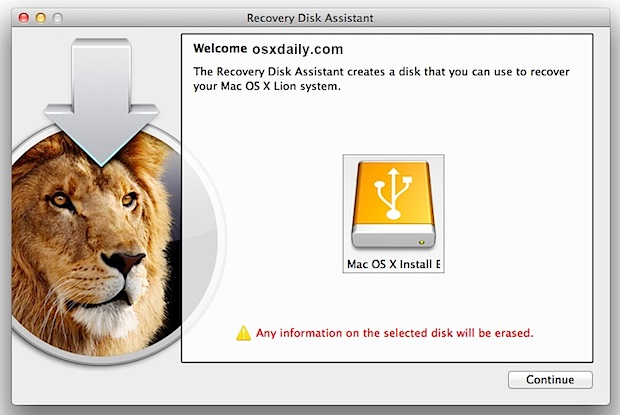
Recovery Disk Tool of Mac OS X Lion By Apple


Apple Inc. on Monday released Lion Recovery Disk Assistant software to enable the users of its latest Mac OS X 10.7 Lion create recovery partitions on external storage devices.
The latest utility offered by the Cupertino, California-based iPhone maker will prove beneficial to Mac Lion users in case their hard drives go kaput.
The software will run every function that a built-in recovery drive in the Lion OS does like re-installing the OS, repairing the drive, restoration from Time Machine storage.

The Lion Recovery Disk Assistant software is available on company’s website for free download. Mac owners can easily use the utility with the help of a flash drive of minimum 1 GB storage space or more. Hard drives connected via a data cable can also be put to use.

"This drive can be used in the event you cannot start your computer with the built-in Recovery HD, or you have replaced the hard drive with a new one that does not have Mac OS X installed," Apple stated on its website.
Apple has warned its users that the new utility software will erase already stored data on the external hard drive therefore it is advisable to back up all the existing data. The recovery tool can be downloaded from the link here.


Fore More information about Lion recovery Disk Software click Here

-News Source (IT-Portal) 

SHARE OUR NEWS DIRECTLY ON SOCIAL NETWORKS:-

Vulnerability in Apple MacBooks Which Could ruin Batteries


One prominent security researcher has discovered a vulnerability in the batteries of Apple's MacBook line of portable computers that could allow hackers to ruin the batteries or install malware on them that could corrupt a Mac.
Charlie Miller, a renowned white-hat hacker who works for security firm Accuvant, plans to reveal and offer a fix next month for a MacBook battery vulnerability he has discovered, Forbes reports. Miller uncovered default passwords, which are used to access the microcontroller in Apple's batteries, within a firmware update from 2009 and used them to gain access to the firmware.

Apple and other laptop makers use embedded chips in their lithium ion laptop batteries to monitor its power level, stop and start charging and regulate heat.
During the course of his tests, the researcher "bricked" seven batteries, rendering them unusable by rewriting the firmware. Of more concern is the possibility that hackers could use the vulnerability to install difficult to remove malware, or, in a worst case scenario, cause the batteries to explode.

“These batteries just aren’t designed with the idea that people will mess with them,” he said. “What I’m showing is that it’s possible to use them to do something really bad.” According to him, IT few administrators would think to check the battery, providing hackers with an opportunity to hide malicious software on a battery that could repeatedly implant itself on a computer.

Miller admitted that he hasn't tried to blow up any batteries, but he did say it might be possible. "You read stories about batteries in electronic devices that blow up without any interference,” he noted. “If you have all this control, you can probably do it.”
another researcher, Barnaby Jack, who works for antivirus software maker McAfee, also looked into the battery issue a couple years ago, but said he didn't get as far as Miller did.

Miller, who is a regular winner of security contests demonstrating Mac, Safari and iPhone exploits, has notified Apple and Texas Instruments of the issue. Despite requests from several other researchers not to proceed, he plans to unveil the vulnerability, along with a fix he calls "Caulkgun," at the Black Hat security conference next month.
"Caulk Gun" will change a battery's default passwords to a random string of characters. While the fix will prevent hackers from breaking into the battery, it would also block any future firmware updates from Apple.

In spite of the battery vulnerability that he uncovered, Miller believes Mac OS X security is better than ever before. According to him, Apple engineers made few security-related changes in the jump from Leopard to Snow Leopard, but they made substantial improvements in Mac OS X 10.7 Lion, which was released on Wednesday.
"Now, they've made significant changes and it's going to be harder to exploit,” he said, as noted by The Register.
“It's a significant improvement, and the best way that I've described the level of security in Lion is that it's Windows 7, plus, plus,” said noted security consultant Dino Dai Zovi.
Apple offered security researchers, including Miller and Dai Zovi, an unprecedented early look at Lion in order to get their feedback.
According to researchers, Lion's biggest security improvement is Lion's support for Address Space Layout Randomization. ASLR randomizes the location of critical system components to reduce the risk of attack. Apple also added sandboxing security measures in Safari that will isolate potential bugs or malware. Finally, the newly revamped File Vault now allows an entire drive to be encrypted.


-News Source (Appleinsider)

SHARE OUR NEWS DIRECTLY ON SOCIAL NETWORKS:-

Mac OS X Lion Said Good-Bye to Analog Communications (Modem)


Mac OS X Lion has killed off a number of things including, but not limited to Rosetta, visible scrolls bars, Quicken (see Rosetta), and unnatural scrolling. Now another casualty is the venerable analog modem.
According to users on MacRumors Forums it is true that Apple has killed off support for the analog Apple USB Modem in Mac OS X Lion since the device is no longer working after they upgraded from Mac OS X Snow Leopard.
When you will try to plug your Apple USB Modem into an available USB port on your iMac and MacBook Air (both running Mac OS X Lion) we will receive the following error message.
"You can not use Apple usb Modem withn this computer"
The problem is being blamed on two issues: the required modem drivers are missing and the drivers only work when your Mac kernel is running in 32-bit mode. Since Lion generally runs in 64-bit kernel mode by default the drivers will not work unless you boot your machine into 32-bit mode. A lively discussion about 32 vs. 64-bit mode can be found here.
The forum discussion included a work around that required modification of your system files and instructions on starting your Mac in 32-bit kernel mode. Unfortunately at press time I wasn’t able to get the suggested work around to work on either of my Macs.
One person, HellDiverUK, on the forum made a comment that I can agree with when they asked, “Modem?” followed by “Last millennium is calling, it wants its outdated technology back. ”  We think Apple agrees and that they are telling you that it looks like it is time to say good-bye to the analog modem and look to alternatives like encrypted email, zip files, PDFs, or secure FTP.

For more information and help to resolve this click Here

-News Source (Culture Of Mac)

SHARE OUR NEWS DIRECTLY ON SOCIAL NETWORKS:-

Mac OS X 10.8 Mountain Lion Developer Preview Released By Apple

Mac OS X 10.8 Mountain Lion Developer Preview Released By Apple


Apple released a developer preview of the next major release of its operating system named Mac OS X 10.8 Mountain Lion. If you are a registered Mac developer then you can test the new flavor of Apple. Not to mention in this release Apple has added lost of charming features among them Gatekeeper is really handy one at leat from security point of view. Apple says gatekeeper will "help prevent you from unknowingly downloading and installing malicious software". Some of other features included by apple are iCloud, AirPlay Mirroring, Messages, Reminders, Notification Center, Share Sheets, Twitter Integration, Game Center and so on.
Brief About Gatekeeper:-
The Gatekeeper feature has three levels of security for running applications downloaded from the Internet; "Mac App Store", "Mac App Store and identified developers" and "Anywhere". The first setting only runs applications downloaded from the Mac App Store, in a style similar to the iPhone only running apps from the App Store. Unlike the iPhone though, Gatekeeper lets users allow applications from other sources. The "Mac App Store and Identified Developers" option only allows applications from the store and from developers who have signed their program with an Apple-issued Developer ID, while "Anywhere" allows any program to be downloaded and run. It is unclear how Gatekeeper interacts with software loaded from other media, such as a USB memory stick or CD/DVD.

For More Information & To Download Mac OS X 10.8 Mountain Lion Developer Preview Click Here


SHARE OUR NEWS DIRECTLY ON SOCIAL NETWORKS:-

Safari Bug, Another MAC Rumor


Another great scoop from Mac Rumors: All the recent attention iOS 5 has distracted people from the new beta of OS X Lion. Looks like Apple snuck a new feature, "Restart to Safari," into the newest beta, which gives Lion a browser user interface. Gee, kinda like Chrome OS. Perhaps it's no coincidence that both browsers are based on Web Kit.
Nearby is a tough-to-read screen shot from Mac Rumors of what looks like the Guest Login screen for that mode. The mode allows you to boot Lion into Safari and just Safari. Superficially it resembles Chrome OS on a Chromebook, but there's no indication that Apple intends to sell computers that boot only into the browser, as Google is doing.
The point, as MacRumors says, seems to be a restricted web kiosk mode. Unauthorized users can have web surfing access without access to the file system or other programs. Lion also has an auto-save and application restore feature so that returning users will find themselves back at the same place they were before the restart.
Is this a good use of a Mac? It certainly makes no sense to buy a Mac purely for Safari web surfing. You'd do better to get a Chromebook or Netbook or cheap PC and lock it into your choice of browser.
So "Restart to Safari" seems to make sense only for occasional use on a Mac where you want to allow someone only web surfing. <yawn!>

SHARE OUR NEWS DIRECTLY ON SOCIAL NETWORKS:-

Is upgrading to Mac OS X v10.6 Snow Leopard still sensible??


While it might seem to some like buying a ticket to the ball game after the seventh-inning stretch, in a helpful article this week, MacFixIt's Topher Kessler advises a qualified "affirmative" to a number of readers still running older Intel Macs that came with OS X 10.5 Leopard or even 10.4 Tiger and are wondering whether they should upgrade to version 10.6 Snow Leopard. Kessler thinks that even with Apple's release of Mac OS X v10.7 Lion not far off, the OS 10.6 Snow Leopard upgrade—available on DVD for upgrading from Leopard or Tiger installations at a modest $29—is still a good idea. I agree unreservedly.

Kessler presents several good reasons why one should still upgrade to v10.6, not least of which that Snow Leopard may be the earliest OS version supporting a direct upgrade to the new OS. He also notes that for MobileMe users, it's a no-brainer. A couple of points in favor he didn't mention are that upgrading to OS v10.6.6 and later will also give you immediate access to the Apple Mac App Store, if that appeals. Also, compatibility with a number of newer software applications for which Snow Leopard is a minimum system requirement already, and there will be even more in the future.

Another point is that Mac OS X v10.6 Snow Leopard upgrade DVDs will likely not continue to be available from Apple for long, if at all, after the v10.7 Lion release, at least if past history is any reliable guide. Therefore, it might be a good idea to snag an uprade disk for possible future reference even if you don't install it right away.

The minimum Mac hardware for installing Lion has not been announced by Apple yet, but it's pretty safe to surmise that some early Intel Macs—possibly models with single-core processor silicon—will be bumped off the bottom rungs of the ladder of Mac OS X v10.7 support. So, for some, Snow Leopard will be the end of the Mac OS upgrade road and a requirement for future-proofing for at least a few more years.

Consequently, for $29, the Mac OS X v10.6 Snow Leopard upgrade is a pretty sweet deal if you have a Mac that will support it; especially an older model. The only downsides I've noticed compared with Mac OS X v10.5 Leopard is that Snow Leopard makes my 2.0GHz unibody MacBook run somewhat hotter, resulting in more cooling fan cycling.

SHARE OUR NEWS DIRECTLY ON SOCIAL NETWORKS:-

Fingerprint Security Solution For Apple Mac OS X Lion & Snow Leopard By AuthenTec

Fingerprint Security Solution (Fingerprint Sensor & TrueSuite Identity Management) For Apple Mac OS X Lion & Snow Leopard By AuthenTec
We have earlier discussed the new security implementation of Microsoft and the new technology is called picture password. Now Apple also introducing digital security system in Mac OS. AuthenTec, a leading provider of mobile and network security launches Fingerprint Security Solution including an Eikon fingerprint sensor and TrueSuite identity management software - for Apple Mac laptops and desktop computers running on Lion and Snow Leopard operating systems.
The new Eikon-TrueSuite offering from AuthenTec includes the following features:-
  • Web site logon (new) – logon to websites with a swipe of the finger; no need to type passwords
  • QuickLaunch (new) –launch and logon to favorite websites; associate
  • websites with different fingers
  • Easy fingerprint enrollment/setup
  • Mac logon
  • Fast user switching
  • Automatic updates (new) – ensure your software always incorporates the newest features

The new Eikon fingerprint reader for Mac and matching TrueSuite user software will be available in March for $59.95 from Apple.com, and AuthenTec’s Web store


According To Release Note:-
 

“Based on the strong demand from the Mac community, we are pleased to offer a
fingerprint security solution with features and functions that enhance the user experience and support the newest Apple OS,” said Tom Aebli, AuthenTec Vice President of Software and eCommerce. “AuthenTec is pleased to offer Mac users the same fingerprint security and convenience features already enjoyed by millions of Windows PC users.”


AuthenTec’s software and eCommerce business supports the millions of fingerprint sensors already integrated into laptops, tablets and mobile phones. The software and eCommerce portfolio includes AuthenTec’s TrueSuite identity management software, Eikon fingerprint readers for PC and Mac, KeepVault online backup services, and mobile and PC applications that enhance security and the user experience.


-Source (AuthenTec)

SHARE OUR NEWS DIRECTLY ON SOCIAL NETWORKS:-

Skype 5.3 Client Released for Apple Mac OS X Lion


(VoIP) outfit Skype has updated its client software for Apple Mac users to version 5.3, which brings support for Mac OS X 10.7 Lion. The latest version of the internet chat software provides a number of fixes and improvements to the interface according to Skype. It also includes support for high definition (HD) video calls, provided you have an HD webcam.
"On the heels of our recent update to Skype 5.2 for Mac OS X, we are pleased to announce that we are making even more improvements to our Mac client with the release of Skype 5.3 for Mac OS X."

It's been just over a month since Skype launched version 5.2. If you haven't got Mac OS X Lion, the latest version of Apple's operating system, then Skype 5.3 is compatible with older versions going back to Leopard.
Other features of the software include group video calling and group screen sharing, for an extra cost. Skype recently made a deal with Microsoft and Facebook has integrated Skype into its social networking web site for video chat. Meanwhile, Windows users are up to Skype client version 5.5, which includes instant messaging to Facebook friends.


To see the Skype blog statement click here
To download Skype for MAC click Here

SHARE OUR NEWS DIRECTLY ON SOCIAL NETWORKS:-

Apple Released Mac OS X Security Update (2011-005) To Stop Certificate Fraud


Apple on Friday issued a security update for Mac OS X 10.7 Lion and 10.6 Snow Leopard, addressing a security issue related to fraudulent online certificates.
Security Update 2011-005 is available to download via Software Update, or as a 15.59MB download for Lion, or 869KB download for Snow Leopard direct from Apple. It is recommended for all Mac users.
The update addresses an issue that could allow an attacker with a privileged network position to intercept user credentials or other sensitive information.
Apple issued the update because fraudulent certificates were issued by multiple certificate authorities operated by DigiNotar. Apple's fix removes DigiNotar from the list of trusted root certificates and from the list of Extended Validation (EV) certificate authorities. The security update also configures the default system trust settings so that DigiNotar's certificates, including those issued by other authorities, are not viewed as trusted.
Another update was also issued by Apple on Thursday for Lexmark printers in the form of Lexmark 2.6 Printer Driver. It includes the latest Lexmark printing and scanning software for both Lion and Snow Leopard, and the 133.99MB update can be downloaded direct from Apple.

-News Source (Apple Insider)


SHARE OUR NEWS DIRECTLY ON SOCIAL NETWORKS:-

Apple Released Mac OS X Lion v10.7.3 & Closes Security Hole

Apple Released OS X Lion v10.7.3 & Closes Security Hole

As expected Apple has released security update 2012-001 for Mac OS X 10.7.3 and, for Mac OS X 10.6.8 Snow Leopard. In this release they have addressed a number of vulnerabilities in the company's desktop and server operating systems. According to Apple through this release they have patched more than 50 security holes such as remotely execute arbitrary code on a victim's system, gain access to private information or cause a denial-of-service (DoS).
The Client and Server updates fix issues in Address Book, ColorSync, CoreAudio, CoreMedia, CoreText, CoreUI, OpenGL, Internet Sharing, ImageIO, and in the QuickTime media player and various libraries used by Mac OS X. Other problems addressed include vulnerabilities in Apache, the libpng reference library, the PHP scripting language, Subversion and X11. Security Update 2012-001 also corrects problems in Tomcat and SquirrelMail.
Users can download Mac OS X Lion 10.7.3 (Client Standard Update 997.01 MB, Client Combo Update 1.2 GB, Server Standard Update 1 GB, Server Combo Update 1.34 GB) and Security Update 2012-001 (Client 192.73 MB, Server 212.09 MB) from Apple's Support Downloads page. Alternatively, Mac OS X users can upgrade to the latest releases using the built-in Software Update function
Additional information can be found on the support page.

For security issue all the users are advised to update their system as early as possible.


-Source (Apple, The-H)


SHARE OUR NEWS DIRECTLY ON SOCIAL NETWORKS:-

Flashback Trojan Infected Over 600,000 Mac-OS Users, Apple Pushes Out Fix Again

Flashback Trojan Infected Over 600,000 Mac-OS Users, Apple Pushes Out Fix Again 

Russian anti-virus vendor Dr. Web spotted a Trojan affecting nearly 600,000 Macs around the world. The near immune image of the Mac OS X has simply crumbled. So much for Macs being relatively safe against malware attacks. That idea took a punch to the stomach this week when the news broke about the Flashback trojan affecting more than half a million Macs worldwide. Flashback is essentially the malware equivalent of a smash-and-grab thief. Exploiting a Java vulnerability, the code installs and runs when the user visits a compromised or malicious website, intercepting private data, like passwords, and sending it back out over the internet. According to Doctor Web, sources claim that “links to more than four million compromised web-pages could be found on a Google SERP [search results] at the end of March. In addition, some posts on Apple user forums described cases of infection by [the latest variant] BackDoor.Flashback.39 when visiting dlink.com.” The trojan, Backdoor.Flashback.39, can infect computers via an infected web page. The vulnerability itself lies in Java, a product which is not Apple’s
About 57% of infected machines were in the US, 20% in Canada, 13% in UK and 6% in Australia. Apple has already issued patches that curb the vulnerability, but it does not necessarily mean that all users have applied the security patch on their Macs. Even Mozilla has block listed all the older and vulnerable Java plug-in from Firefox. Users are recommended to install the recent Apple Java update to close the hole which allows malicious web pages to drop the trojan onto a system and to always check which application is actually asking for your password when requested.

Update: To detect if a system is infected with Flashback, run each of the following commands in the Mac OS X Terminal:-
defaults read ~/.MacOSX/environment DYLD_INSERT_LIBRARIES
defaults read /Applications/Safari.app/Contents/Info LSEnvironment
defaults read /Applications/Firefox.app/Contents/Info LSEnvironment


If all these commands respond with "The domain/default pair of ... does not exist", then there is no Flashback infection. Otherwise consult the F-Secure advisory for manual removal instructions.

If you’re running Mac OS X v10.6.8, Mac OS X Server v10.6.8, OS X Lion v10.7.3 and Lion Server v10.7.3, be sure to hit up Software Update in your System Preferences.


SHARE OUR NEWS DIRECTLY ON SOCIAL NETWORKS:-

Pwn2Own 2013 -Hack Major Browser, Adobe Reader, Flash or Java & Earn in Million Dollars


Pwn2Own 2013 -Hack Major Web-browser, Adobe Reader, Flash or Java & Earn in Million Dollars 

Since the last two years the Pwn2Own hacker contest has become an important fixture in the world of testing the security of software applications, operating systems and hardware devices. In last two years we have seen several hackers, security professionals have expressed their enthusiasm and joined Pwn2Own where four major and widely browser's security get compromised, in order to make applications, software more safe and secure. Last year we have reported how different hackers across the globe taken part in Pwn2Own and successfully hacked Google Chrome, IE & Firefox, and earned millions of dollars. But the contest of this year has some more twist than before as, HP TippingPoint and Google, sponsor of Pwn2Own, has made clear that it is expanding the focus of the competition beyond browsers. Also, Pwn2own 2013 will include $560,000 in prize money for demonstrations of exploits in the major web browsers, Adobe Reader, Adobe Flash or Oracle Java

Contest Dates:-

The contest will take place the 6th, 7th, and 8th of March in Vancouver, British Columbia during the CanSecWest 2013 conference. DVLabs blog post will be updated as the contest plays out and get real-time updates by following either @thezdi or @Pwn2Own_Contest on Twitter or search for the hash tag #pwn2own.

Rules & Prizes:-

HP ZDI is offering more than half a million dollars (USD) in cash and prizes during the competition for vulnerabilities and exploitation techniques in the below categories. The first contestant to successfully compromise a selected target will win the prizes for the category.
  • Web Browser
    • Google Chrome on Windows 7 ($100,000)
    • Microsoft Internet Explorer, either
      • IE 10 on Windows 8 ($100,000), or
      • IE 9 on Windows 7 ($75,000)
    • Mozilla Firefox on Windows 7 ($60,000)
    • Apple Safari on OS X Mountain Lion ($65,000)
  • Web Browser Plug-ins using Internet Explorer 9 on Windows 7
    • Adobe Reader XI ($70,000)
    • Adobe Flash ($70,000)
    • Oracle Java ($20,000)
The targets will be running on the latest, fully patched version of the Windows 7, 8, and OS X Mountain Lion. All targets will be installed in their default configurations, as this is how a majority of users will have them configured. As always, the vulnerabilities utilized in the attack must be unknown and not previously reported to the vendor. If a sandbox is present, a full sandbox escape is required to win. A given vulnerability may only be used once across all categories.
Upon successful demonstration of the exploit, the contestant will provide HP ZDI a fully functioning exploit and all the details of the vulnerability used in the attack. In the case that multiple vulnerabilities were exploited to gain code execution, details about all the vulnerabilities (memory corruption, infoleaks, escalations, etc.) leveraged and the sequence in which they are used must be provided to receive the prize money. The initial vulnerability utilized in the attack must be in the registered category.
Along with prize money, the contestant will receive the compromised laptop and 20,000 ZDI reward points* which immediately qualifies them for Silver standing. 

Full contest rules can be found at http://dvlabs.tippingpoint.com/Pwn2OwnContestRules.html, and may be changed at any time without notice.

Registration:-
Contestants are asked to pre-register by contacting ZDI via e-mail at zdi@hp.com. This will allow the organizer to ensure that they have the necessary resources in place to facilitate the attack. If more than one contestant registers for a given category, the order of the contestants will be drawn at random.


SHARE OUR NEWS DIRECTLY ON SOCIAL NETWORKS:-

Vulnerability In OS-X 10.7 Lion Allowing to Change Passwords UN-Authorizedly

A researcher at the Defense in Depth blog has discovered a flaw in Apple's recently released operating system, OS X 10.7 (Lion), which allows passwords to be changed without knowledge of the logged in user's password. The flaw appears related to Apple's move towards a local directory service which has permissions set in an insecure manner. An attacker who has access to a logged in Mac (locally, over VNC/RDC, SSH, etc) is able to change the currently logged in user's password without knowing the existing password as would normally be required:

testmac:~ TestUser$ dscl localhost -passwd /Search/Users/TestUser
New Password:


Historically (in Snow Leopard) you would have needed to enter your existing password first to verify that you in fact are the account holder:

testmac:~ TestUser$ passwd
Changing password for TestUser.
Old Password: -OldPass-
New Password: -NewPass-
Retype New Password: -NewPass-


Not only can a logged in user change their password without knowledge of the existing password, but you can read any other users password hash and make attempts at brute forcing it. Defense in Depth showed how you can parse the hash from openly readable directory information and recover both the hash and the salt used to encrypt the password. This is another great reason to be sure you have secured your Mac properly until Apple makes a fix available. Taking the following steps will help ensure you are protected:

  • Use a secure password to prevent brute force attacks against your account using stolen hashes.
  • Enable the screensaver and set it to prompt you for your password.
  • Disable automatic logon.
  • Never leave your Mac logged in and unattended. Use a "Hot Corner" or the Keychain lock to lock your screen.

For more information and to see the researcher blog post click Here


-News Source (NS & Defence Blog)

SHARE OUR NEWS DIRECTLY ON SOCIAL NETWORKS:-

Related Posts Plugin for WordPress, Blogger...